Home Health Agency Operations SaaS
Run scheduling, billing, EVV, and caregiver workflows from one secure operating system.
AlexionCare helps home health agencies move from fragmented spreadsheets and manual claim checks to a connected SaaS workflow for intake, authorizations, caregiver mobile visits, pre-billing validation, and state EVV aggregator transmission.
Public landing page only. Do not submit patient names, Medicaid IDs, clinical details, or other PHI.
40–50%Less administrative time
30–60%Fewer billing errors
100%EVV-ready mobile workflow
Live Agency Command Center
FHIR R4 Ready
Claim readiness
86%
HIPAA-aware SaaS architecture
RLS tenant isolation
FHIR R4 data model foundation
EVV mobile handoff
RCM validation engine
Core Features
Built around the real home health data journey.
Each module is designed to reduce operational leakage between intake, schedule creation, caregiver documentation, billing, and state aggregator submission.
Smart Scheduling
Match caregivers to patients by availability, discipline, credential status, geographic proximity, authorization limits, and patient preference.
- Real-time schedule synchronization
- Prior authorization guardrails
- Missed-visit risk alerts
Automated Billing & RCM
Scrub EVV, schedule, authorization, caregiver, and care plan records before claim generation to reduce denials and rework.
- Pre-billing validation rules
- Discrepancy flagging in real time
- Claim readiness dashboard
EVV-Compliant Mobile Workflow
Capture the six mandated visit data points with caregiver mobile clock-in/out, GPS geofencing, signatures, and offline-first sync.
- Service type and patient identity
- Caregiver identity and location
- Date, start time, and end time
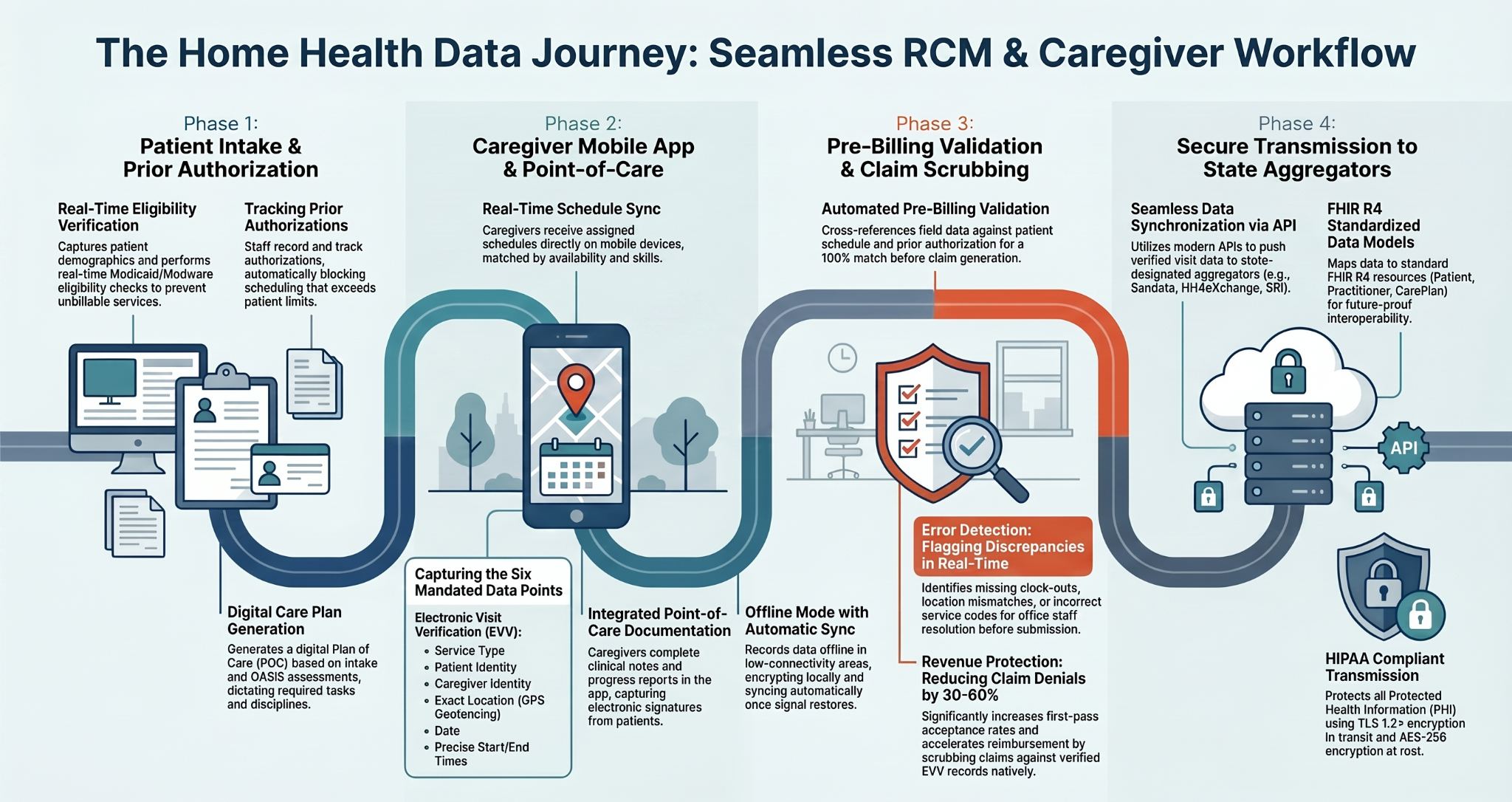
Seamless Data Journey
From patient intake to aggregator transmission.
The landing page aligns with the SaaS platform story: intake and prior authorization, caregiver mobile point-of-care, pre-billing validation, claim scrubbing, and secure API transmission.
ROI Calculator
Estimate recovered operating capacity.
Use this public calculator as a conversation starter. Real ROI requires agency-specific visit volume, payer mix, denial rates, and state aggregator requirements.
40Caregivers
100Admin hrs saved / wk
30–60%Billing error reduction target
Displayed metrics are planning assumptions for marketing and discovery, not a guarantee of financial outcome.
Secure Handoff
Marketing site outside the PHI boundary. Main portal inside the secure SaaS boundary.
The WordPress landing page is intentionally separated from the operational application. Public forms capture business lead data only. Authenticated users enter the Main App Portal through the configured secure login URL.
Access Main App PortalStart Free Trial
Open a guided trial workspace.
Capture the agency business profile, then route the administrator to the secure SaaS onboarding path. The operational portal should handle authentication, BAA workflow, tenant provisioning, and application access.
- Trial request stored in WordPress lead table
- Admin receives notification email
- User can be redirected to app onboarding
Request a Demo
See the full caregiver-to-claim workflow.
Use the demo conversation to evaluate scheduling rules, EVV data capture, claim scrubber logic, state aggregator handoff, tenant isolation, and FHIR R4 readiness.
Recommended demo agenda
1. Agency intake workflow
2. Caregiver mobile visit capture
3. Pre-billing scrubber findings
4. Secure app portal login and tenant handoff
SaaS Onboarding
Simple plans that grow with the agency.
Pricing cards are built into the theme and can be edited in WordPress or replaced with WooCommerce subscription products later.
Launch
For small agencies validating digital scheduling and EVV workflow.
Demo PricingStart TrialGrowth
For agencies needing scheduling, EVV, RCM validation, and reporting.
Most PopularRequest DemoEnterprise
For larger agencies requiring advanced integrations, SSO, and custom deployment.
CustomTalk to SalesFAQ
Built for conversion without creating compliance risk.
Does the WordPress landing page store PHI?
No. The included forms are limited to business lead data. Keep patient and clinical data inside the secure SaaS application only.
Where does the secure login button go?
Configure the Main App Portal Login URL in Appearance → Customize → AlexionCare SaaS Links.
Can this work with WooCommerce subscriptions?
Yes. The CTA links can point to WooCommerce products, checkout pages, or your SaaS onboarding service.
Can it be edited with Elementor?
Yes. The theme provides a fast custom landing page, but you can also recreate or override sections in Elementor using the same copy, colors, and CTA structure.